One of our fearless
undergrad students at the University of Colorado-Denver, Zainab Hashem, recently
developed a deep expertise on the use of visualizers in the classroom. She developed
a solid lesson plan for use with the document camera, one that is student and
not technology oriented. Here is her fabulous lesson plan and a picture of her
presentation:
Thoughtful discussions about emerging and high-leverage technology use in education: the classroom DOCUMENT CAMERA
Showing posts with label DocCam. Show all posts
Monday, July 31, 2017
Monday, March 17, 2014
What's New in 2014
There are a lot of new things happening in the
world of document cameras and visualization tools, as evidenced in the first
two major conferences of 2014 (FETC and TCEA).
Here are some quick news bytes:
AverInformation
AverInfo featured a redesign of the user interface
of the software that controls their document cameras, pictured below.
It's a good
move, based on my previous post, entitled “Improve This!”
ExoLabs
This is the first time I have seen ExoLabs at one
of these conferences, and they made a splash with their new microscope camera
and their close up camera with a mounting stand, pictured below.
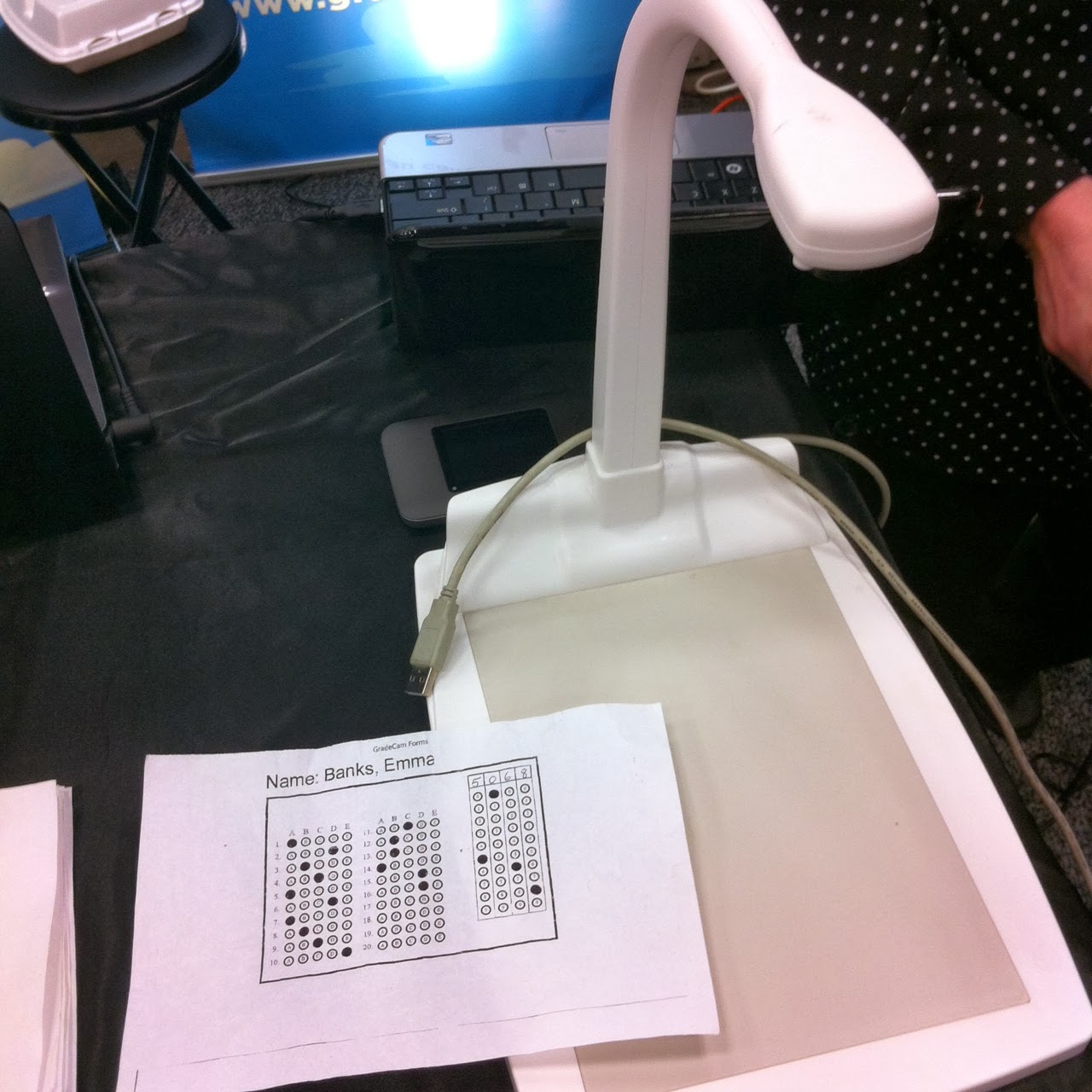
GradeCam
GradeCam made a first time entry with an
assessment scoring all-in-one solution, pictured below. Not a document camera,
they claim, but it looks like one to me. Perhaps we can call it a single-purpose document
camera?
Fujitsu
Fujitsu also entered these exhibit halls for the
first time with a dedicated scanning solution, designed to bring high quality
to image capture, while replacing the long-asleep flatbed scanner. This generation of hardware is called their "scansnap" line. But I am bit
worried--what they were modeling might indeed be illegal.
Lumens
Standard Lumens visualizers were on display in a
typically attractive booth. “Pass-through HDMI inputs” were the newest feature they
were promoting. Lumens would do better to return to teacher-centered messaging.
See my blog post entitled “Visualize
Better Messaging.”
In the next two posts, we will highlight some of
the ground-breaking trends being offered two of the document camera companies exhibiting
at TCEA and FETC.
Monday, February 3, 2014
2013 VIZ Word Cloud
Here’s a graphic word cloud of all the
key words or themes in our Future-Talk
VIZ blog during
the year 2013. The more the word is found, the larger it appears in this
word cloud. The word cloud is interactive, so explore a bit!
It’s quite interesting to visualize, in
this way, the recurring themes and concepts that have emerged from Future-Talk VIZ this last year. It’s like putting your fingers on the
pulse of what’s happening with visual educational
strategies—and taking a
read.
Monday, November 4, 2013
A New Kid on the Block
![]() |
| The eInstruction ShareView |
eInstruction, the audience response and
interactive white board manufacturer recently entered the document camera
market with a low-cost ($139), portable document camera offering.
Coupled with its Workspace
Connect software, the ShareView
document camera can not only display classroom resources, it can allow
annotation via student mobile devices running their app.
Interestingly, when folded up, the ShareView can
serve as a webcam for web conferencing or headshot recording.
Still, the document camera market is so crowded these days, it will be quite interesting to see if this merely becomes a nice add-on to their interactive whiteboard and clickers ecosystem, or if it will be able to stand on its own.
Labels:
App,
DocCam,
eInstruction,
ShareView
Location:
Grand Cayman
Monday, October 21, 2013
Doc Cams in Online Teaching
I periodically conduct a short workshop featuring
techniques and resources for using document cameras in support of online
teaching. Here are some of the main advantages I like to discuss in these workshops:
Techniques
- Picture-in-picture synchronous teaching
- Doc-Casting
- Personalized assessment: voice and color-annotated feedback
- Scanning (e.g., PDF preparation)
- Digital stills
- Live demonstration toolset: presentation and annotation
Strategies
- Aiming at the Abstract: Visualization
- Use / Re-use (make it once, use it many times)
- Time-saving (efficiency)
Document cameras can do so much in support of
online teaching—so much so that these devices should become a required part of
the online instructor’s basic equipment toolkit.
Monday, March 4, 2013
iPads as Doc Cams
What do you make of this trend?
Will it last? For now, just take a look at this interesting phenomenon. I will
comment on the relevance of this development in a future post after I interview lots and lots of teachers about the concept.
(Note: I have completed my extensive teacher interviews and have posted the results here.)
Monday, February 18, 2013
2013 Super List
Here’s my comprehensive
list of all known visualizers on the market. (If you see one missing, please
leave a comment below.) Use this list for purposes of product evaluation,
comparing features, bidding, and identifying RFP resources for your classroom
document camera needs:
Top Manufacturers in K-20 settings (in
alphabetic order)
Other Notable Manufacturers (in
alphabetic order)
All
in Learning ($25 dollar Doc Cam) www.allinlearning.com
Buhl http://www.hamiltonbuhl.com/store/c/3161-Visual-Presenters.aspx
Monday, February 4, 2013
Lights, Camera, Action!
Teachers who want to use classroom document
cameras well must master some of these indispensable lighting
secrets:
Document Camera Lamps Matter
- Don’t be afraid to use the built-in lamp on your document camera for fear of bulb replacement. These LED lights typically have a 60,000 hour life!
- Sometimes artifacts or documents, due to their color and ambient room lighting, look better when you turn on the document camera’s LED lamp; sometimes items look better if the lamp is on, but room lights are dimmed. To find the best and sharpest image, try different combinations.
Room Lights Matter
Most classrooms today were built in the last
century. Even classrooms in new schools were built by architects born in the
last century. Most ceiling lighting is placed in rooms by architects based on canned
lighting formulas. Enter the modern age of document cameras, and sometimes ceiling
lights mess your display up: with the lights on, your visual display loses
colors or fades unnaturally; with the lights off, the visuals are fine, but
students cannot take notes or complete supportive desk work. Some common
solutions include:
- Turn off the bank of lights closest to the display screen or document camera to prevent white out or color bleeding
- Purchase a lamp for the back of your room that enables you to turn off al lights, and student can still see their desk activities
- Use various combinations of room lighting and document camera lamps to produce the best instructional results.
Tables Matter
- Test and compare different display surfaces to ensure the best and sharpest display possible. (Some wood-grained display tables, and even gray-topped tables, can cause document cameras to have problems. Images can be slightly out of focus or not as bright and sharp as desired.)
- Better display results are always achieved when I layer the teaching display surface with a mat, construction paper, or other contrasting flat background. Experiment to find the best solution.
Monday, July 9, 2012
Wireless Doc Cams
At two recent
technology conferences, teachers in my sessions have evidenced keen interest in
the instructional freedom offered by wireless document cameras. Only three companies make
wireless document cameras as of this date.
To compare on your own, take a look at these brief videos on each product. I have simply ranked the products by published wireless transmission
distances:
- Lumen’s Wireless Ladibug offers a healthy distance of 95 feet and is a strong player.
- AVerInformation’s W30 offers a 45 foot range, and a sleek look.
- Elmo's brand new wireless document camera offers a slick, small form factor look, and collapses nicely, with a wireless distance of 33 ft.
Labels:
AVerInformation,
conferences,
doc cam,
DocCam,
document camera,
donkey cam,
Elmo,
Lumens,
wireless
Location:
San Diego, CA, USA
Monday, June 25, 2012
InfoComm 3D DocCam Update
Here’s a timely update on last week’s 3D Document Camera Post. Last week I was at InfoComm 2102 and was able to see the new Lumens 3D document Camera up close and in action. I also found another 3D document camera hitting the market, produced by Wolfvision. Here’s what I found:
Lumens 3D Ladibug. The form factor is attractive and the visualization quality, using a DLP ultra-short throw projector was stellar. This unit will retail in the $700+ range and is well worth the money. Although aimed at the K-20 education market, the quality of image is stunning. It should fit anywhere.
A science lesson demonstration featuring long-time 3D educator,
Nancye Blair, using the Lumens 3D Ladibug.
|
WolfVision 3D Document Camera. This 3D document camera is ceiling mounted and designed for industrial and advanced medical applications. The model shown was just released and retails for around $30,000. The sales rep was not able to demonstrate it well or answer simple questions about application, so I ended up explaining how it could be used to several University passersby. I also showed the sales rep how this technology is best viewed 10+ feet away, not up close, as they were doing. The latency on the document camera was quite significant, but I expect they will improve upon this problem in future updates.
Demonstrating the WolfVision 3D document camera at InfoComm
|
Labels:
conferences,
DocCam,
document camera,
Lumens,
WolfVision
Location:
San Diego, CA, USA
Monday, June 11, 2012
A 3D Ladibug
Ground-breaking news in the document camera world. Lumens recently released their new 3D Ladibug
document camera. This high-definition document camera comes 3D-ready for both
3D projectors and 3D TVs. And don't worry, educators! The 3D Ladibug easily can function as a 2D visualizer, as well!
Lumens is a power player in the document camera industry, so this product
release is not a trivial matter.
The context of this product release is not trivial within
the education market either. A 3D document camera can be
used by teachers to showcase immersive science experiments or model math skills
through the visual display of manipulatives, tiny ‘blocks’ or shapes that teach
place value, fractions, measurement, or geometry—with depth. More
importantly, the 3D document camera becomes another stout tool for content creation. Imagine student
dioramas, stick or finger puppet shows, or model displays—again, with depth.
And even primary children can ‘design’ the content. To learn more, take a look
at this case study link and the following product data sheet link. You can also see live demonstrations
on the exhibit hall floor at ISTE 2012 in San Diego in June. It’s fun to be alive.
The context of this product release is not trivial within
the education market either. A 3D document camera can be
used by teachers to showcase immersive science experiments or model math skills
through the visual display of manipulatives, tiny ‘blocks’ or shapes that teach
place value, fractions, measurement, or geometry—with depth. More
importantly, the 3D document camera becomes another stout tool for content creation. Imagine student
dioramas, stick or finger puppet shows, or model displays—again, with depth.
And even primary children can ‘design’ the content. To learn more, take a look
at this case study link and the following product data sheet link. You can also see live demonstrations
on the exhibit hall floor at ISTE 2012 in San Diego in June. It’s fun to be alive.
Labels:
conferences,
DocCam,
document camera,
Lumens,
visualizer
Location:
Las Vegas, NV, USA
Monday, May 28, 2012
Conference Talk
After attending FETC
2012 in Orlando and TCEA in Austin, I came away with a fresh wind of
perspective as the 2012 ed-tech conference season got under way. A strong
document camera technology presence was the most visible and thriving component of the educational exhibit halls at these conferences. Strong new players joined the existing market
leaders, stepping up to compete with the interactive whiteboard (IWB) crowd. The bottom line: the document camera market is growing, getting smarter, and maturing. And that's because the document camera is clearly loved by teachers.
By the way, I am scheduled to again deliver my popular 2 -hour workshop, Cultivating Your Donkey Cam Kung Fu, at the Colorado TIE Conference in Copper Mtn, June 19-21. Be there if you can.
Labels:
conferences,
DocCam,
document camera,
Manufacturers
Location:
San Diego, CA, USA
Monday, May 14, 2012
It's All in the Touch
![]() |
| Vidifox PV 700ST |
It's the new kid on the block, sort of. Vidifox manufactures Optoma document cameras and two of the Buhl doc-cam models (the VP 25 and the VP 35). But at FETC and TCEA, they showcased their own line of products.
Vidifox has just introduced a portable document
camera with a built-in touch sensitive 7" tablet. This new portable document camera works with a computer, but doesn't require a computer. It allows users to annotate and archive up to 400 annotations on board, retrievable through a flash drive or computer. See this press release for further information.
Monday, April 30, 2012
VIZ Word Cloud
Here’s a graphic word cloud of all the words in my new book, Digital Shapeshifter. The more the word is found in the book, the larger it appears in this word cloud. (Click on the graphic to enlarge it.)
It’s quite interesting to visualize, in this way, the recurring themes and concepts that emerge from the first book published on the topic of document cameras in the United States. It’s like putting your fingers on the pulse of what’s happening with document cameras in the classroom—and taking a read.
Subscribe to:
Posts (Atom)